MUHAMMADZAIN
← Back to work
Odoo Owner Toolkit · Chrome extension

Parts Insight

Every answer about a part — in one side panel.

Stock, cost, sales history, customers, landed cost and stock-outs, live from Odoo. It opens beside whatever screen you're on, so the answer is there before the customer finishes asking.

Live from OdooOpens beside any screenNo menus, no filters
Parts Insight open next to Odoo on a laptop
The problem

A customer asks about a part. To answer, someone opens Inventory for stock, Purchase for cost, Sales for history and Accounting for the customer — four menus, several filters, while the customer waits.

The fix

Parts Insight sits in Chrome's side panel next to Odoo. Type a part number, and stock, cost, buyers and problems are already on one screen.

Take the tour

One panel. Four tabs.

Real screens from a live Odoo. Names and part numbers are blurred to protect the business.

01
Part · Stock & Location

Do we have it — and where?

Type a part number and the answer is waiting: what is on hand, what is already promised, and exactly which shelf it sits on.

  • On hand, reserved and stock value at a glance
  • Quantity by warehouse and bin location
  • What reserved stock is reserved for — transfer or delivery
  • Copy a ready-made part summary in one click
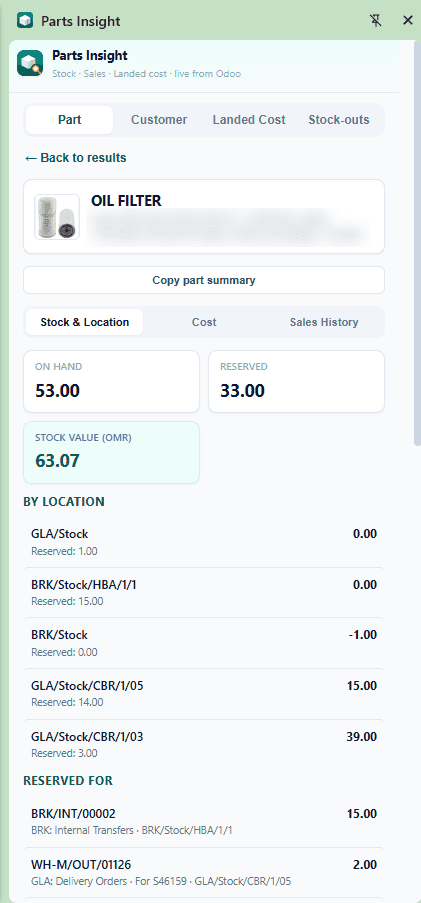
Parts Insight stock and location view
02
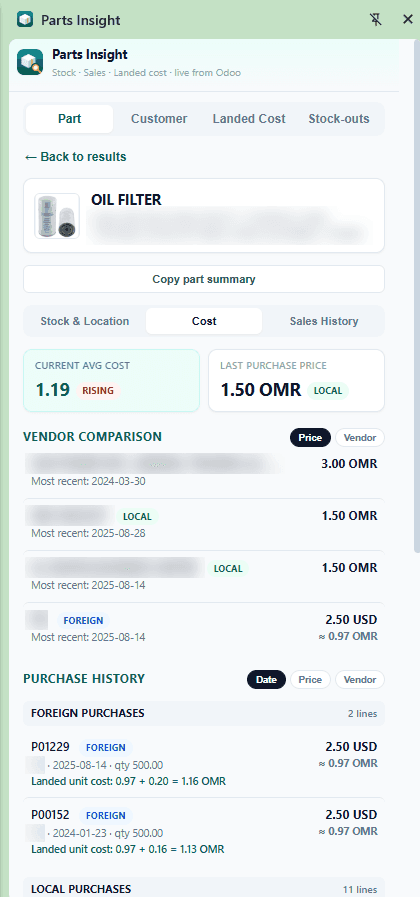
Part · Cost

What does it really cost us?

Before quoting a price, see the real cost — including freight and duties — and which supplier gives the best deal.

  • Current average cost with a rising or falling signal
  • Last purchase price, local and foreign
  • Vendor comparison with automatic currency conversion
  • Purchase history with the landed unit cost of every line
Parts Insight cost and vendor comparison view
03
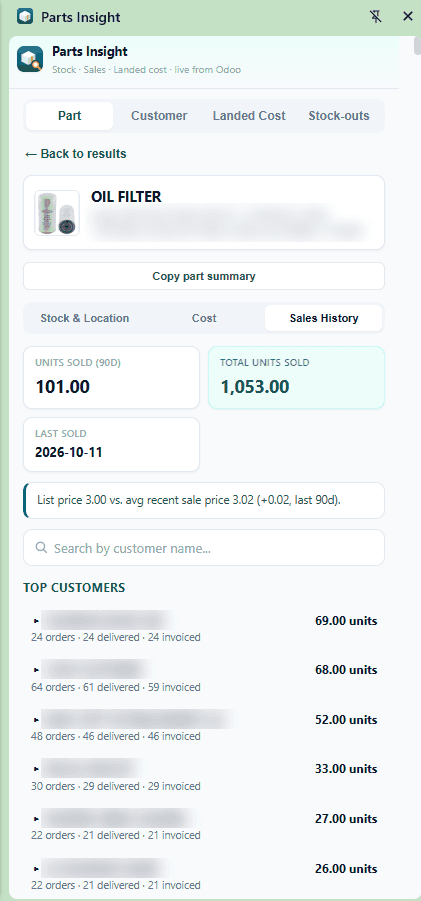
Part · Sales History

Who buys it — and at what price?

See how fast a part moves and who your best customers for it are, without building a single report.

  • Units sold in the last 90 days and all time
  • Last sold date
  • List price compared with the actual average sale price
  • Top customers with orders, deliveries and invoices
Parts Insight sales history view
04
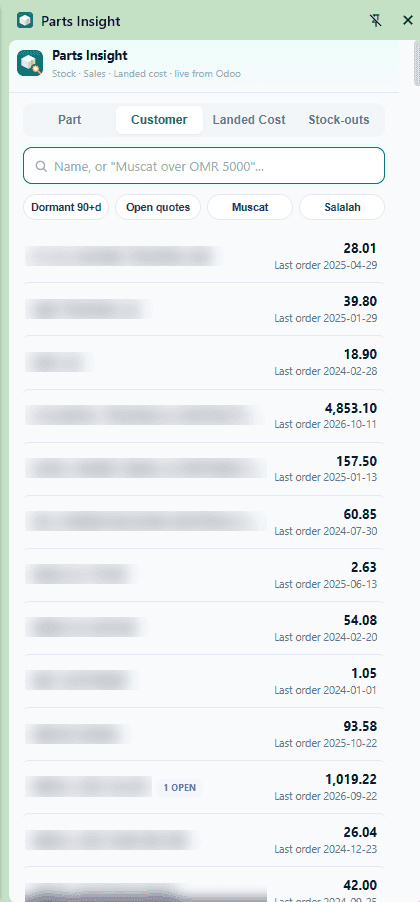
Customer

Which customers need attention?

Find any customer in plain language and spot the ones who have gone quiet or are waiting on a quote.

  • Search by name — or by phrases like “Muscat over OMR 5000”
  • One-tap filters: dormant 90+ days, open quotes, by city
  • Value and last order date for every customer
  • Open quotes flagged right in the list
Parts Insight customer view
05
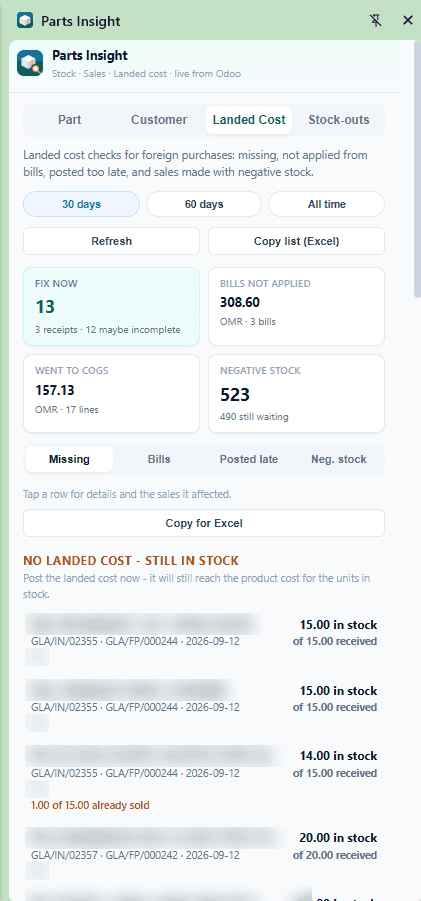
Landed Cost

Is our product cost right?

Landed cost mistakes quietly distort margins. Parts Insight finds them for foreign purchases before month-end does.

  • Receipts with no landed cost while stock is still on hand
  • Bills not yet applied to landed cost
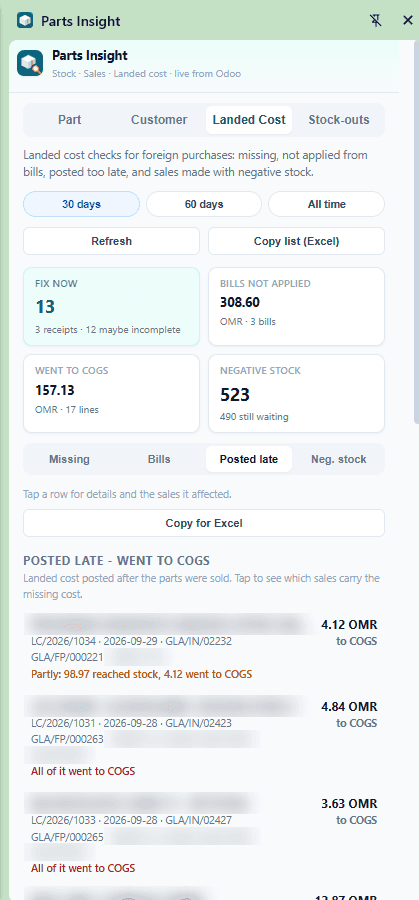
  • Landed cost posted too late — and how much went to cost of goods sold
  • Sales made on negative stock
  • 30 days, 60 days or all time — and copy to Excel
Parts Insight landed cost — missing
Parts Insight landed cost — posted late
06
Stock-outs

Where are we selling stock we don't have?

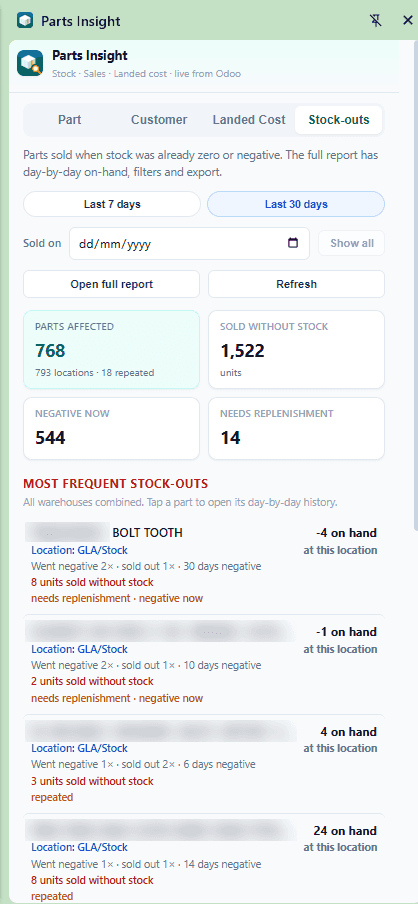
Selling parts the system says you don't have breaks costing and replenishment. This tab shows where it happens and how often.

  • Parts sold when stock was already zero or negative
  • Units sold without stock, parts negative now, parts needing replenishment
  • Most frequent stock-outs by location
  • Full day-by-day report with filters and export
Parts Insight stock-outs view
Who it's for

Built for the people who run the counter.

Counter & sales staff

Answer stock, price and availability questions while the customer is still on the phone.

Owners & managers

See cost changes, slow payers and stock problems before they show up in the profit and loss.

Accounts & purchasing

Catch missing or late landed costs and negative stock before month-end closing.

Chrome ExtensionJavaScriptOdoo APILive dataSide panel
Parts Insight for your business

Want every part answer on one screen?

I'll show you Parts Insight on a live Odoo and tailor the tabs to how your team actually works.

More from the Odoo Owner Toolkit