MUHAMMADZAIN
← Back to work
Odoo Owner Toolkit · Chrome extension

Aged Receivables & Payables

Who to chase, who to pay — on one screen.

Overdue customers, unpaid supplier bills, ageing and priorities, live from Odoo in a side panel. No accounting reports to run, no filters to rebuild, no exports to clean up.

Live from OdooMulti-currencyOne-click Excel copy
Aged Receivables & Payables open next to Odoo on a laptop
The problem

To know who to chase, someone opens Accounting, runs the aged report, filters it, exports it to Excel and then looks up each customer's invoices one by one. By the time the list is ready, the day is gone.

The fix

Open the side panel and the answer is already there: who owes the most, who is the oldest, and what to do first — with every invoice one tap away.

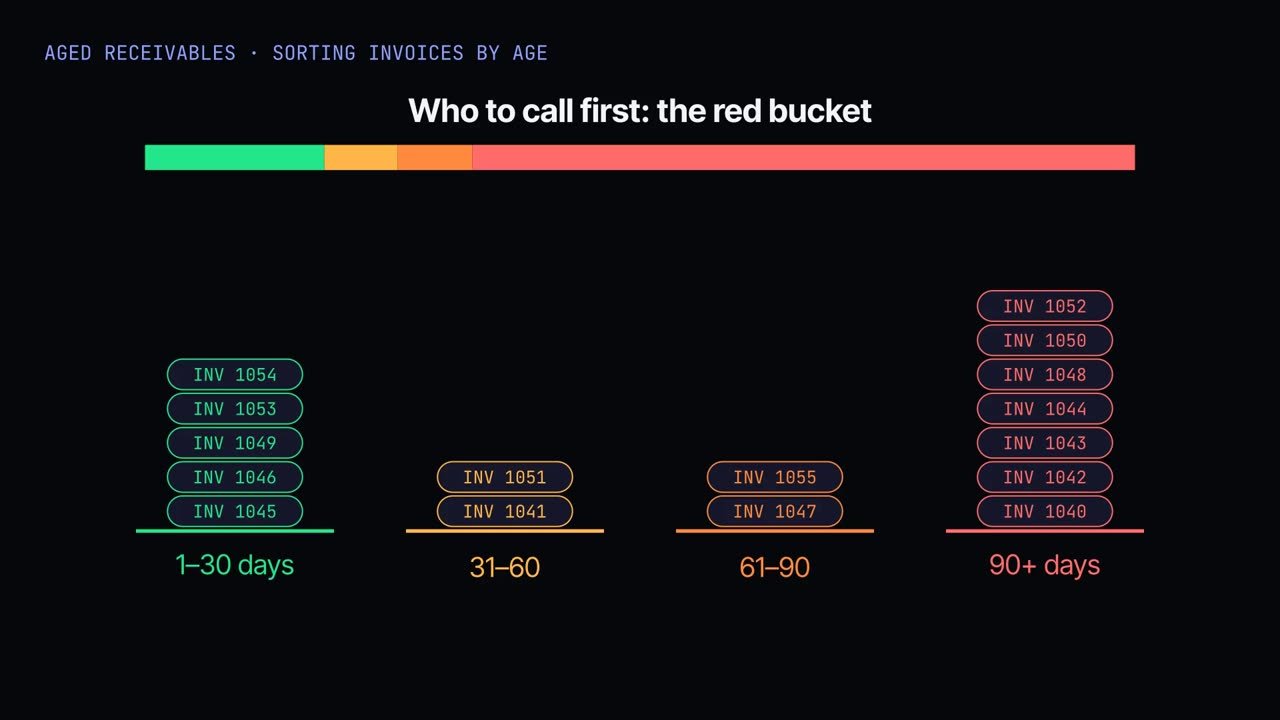
Every invoice, sorted by age — and who to call first
Every invoice, sorted by age — and who to call firstAnimated explainer
Take the tour

One panel. Both sides of your cash.

Real screens from a live Odoo. Customer and supplier names are blurred to protect the business.

01
Receivables

Who owes us — and who do we call first?

The panel opens with one plain-English line: how much is overdue, from how many customers, and who to chase first.

  • Overdue total, customers, invoices and average days overdue
  • Colour-coded ageing bar: 1–30, 31–60, 61–90 and 90+ days
  • Search like “over 90 days” or simply type a name
  • Filter overdue only or all open; sort by amount, days, priority or name
  • Copy the whole table to Excel in one click
Customer drill-down

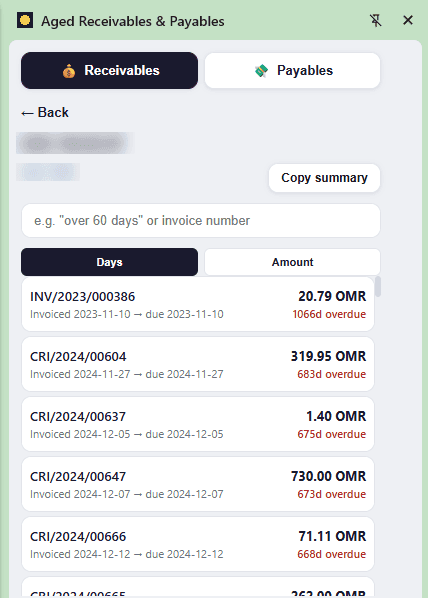
What exactly is overdue for this customer?

Tap any customer to see every open invoice — ready for the follow-up call or message.

  • Every open invoice with invoice date, due date and days overdue
  • Call the customer straight from the panel
  • Copy a ready-made summary to send as a reminder
  • Sort by days or amount; search by invoice number
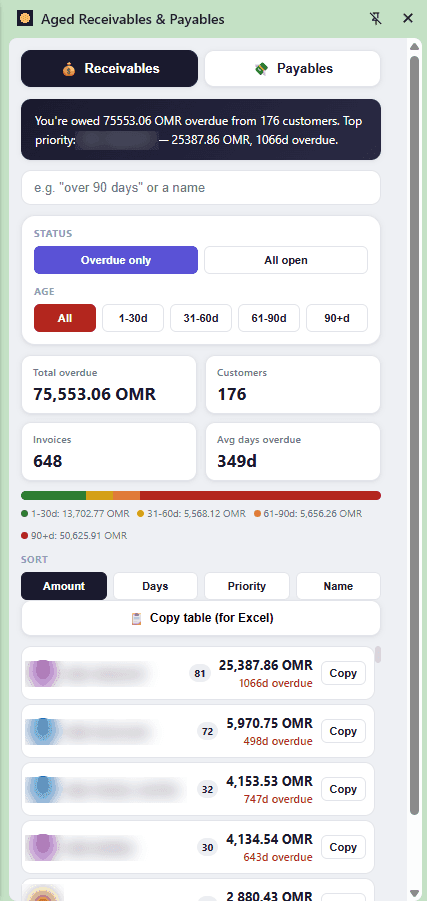
Receivables overview in the extension
Overdue invoices for one customer
02
Payables

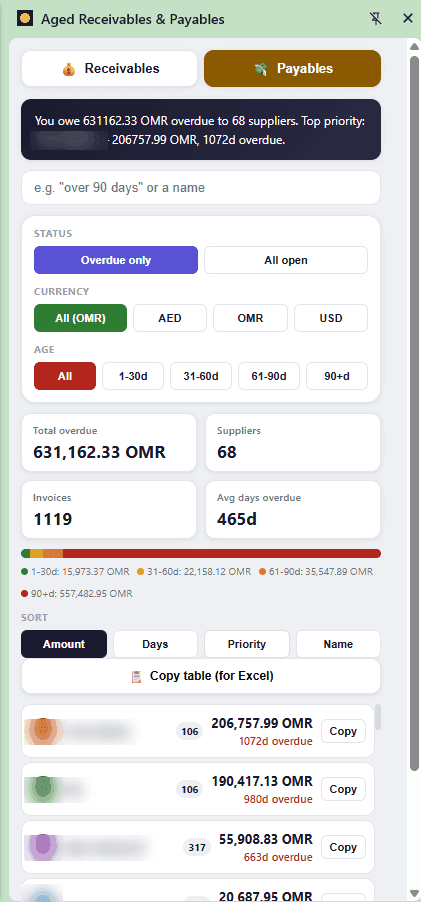
What do we owe — and what is most urgent?

The same clarity for the other side of cash: which suppliers are waiting, how long, and how much — across currencies.

  • Plain-English summary with the top-priority supplier
  • Multi-currency: AED, OMR and USD, with totals converted to OMR
  • Same ageing buckets, filters and priority sorting
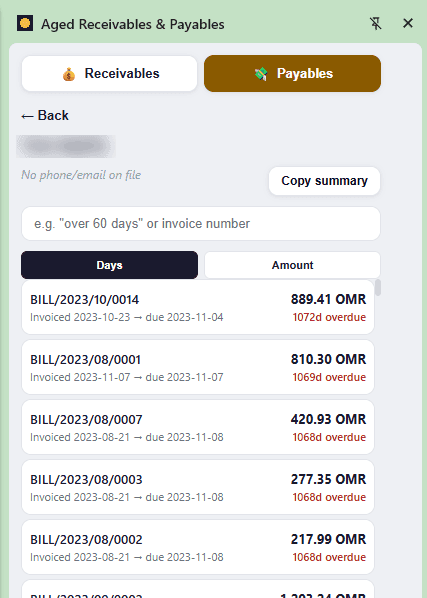
  • Tap a supplier to see every open bill and its due date
  • Copy a supplier summary for payment planning
Payables overview in the extension
Open bills for one supplier
Who it's for

Built for the people who watch the cash.

Owners

Know in seconds how much is stuck with customers and how much you owe — without asking accounts.

Collections & sales

A ready call list every morning, with each customer's open invoices and a summary to send.

Accounts & finance

Plan supplier payments by age, amount and currency, and copy any view straight into Excel.

Chrome ExtensionJavaScriptOdoo APIMulti-currencySide panel
Receivables & payables for your business

Want to know who to chase before your coffee?

I'll show you the extension on a live Odoo and set the filters and priorities around how your team collects and pays.

More from the Odoo Owner Toolkit